

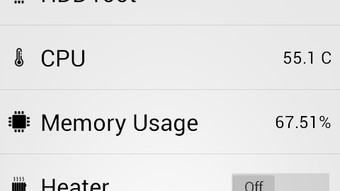
Description
Download MyDomoticz APK – Home Automation, Remote Control, Smart Home Monitoring
Overview
MyDomoticz is a mobile application designed to provide remote access to Domoticz, a popular home automation platform. Developed by Tekas Soft, the app falls under the Multimedia category with a focus on video and home automation utilities. Its primary purpose is to allow users to monitor and control their smart home systems from an Android device. The app enables real-time visibility into environmental data such as temperature, humidity, and energy consumption, offering users a centralized dashboard for their automated home environment.
Target users include homeowners, smart home enthusiasts, and individuals managing IoT-based systems through Domoticz. The app is particularly useful for those who want to adjust lighting, regulate thermostats, or operate garage doors remotely. By offering mobile access to a home automation system, MyDomoticz enhances convenience and responsiveness, allowing users to manage their environment from anywhere with an internet connection. The application was released on March 12, 2024, and is available at no cost, making it accessible to a broad audience.
Key Features & Capabilities
- Remote access to Domoticz home automation systems via Android devices.
- Real-time monitoring of environmental conditions including temperature and humidity.
- Control of connected devices such as lights, thermostats, and garage doors.
- User-friendly interface designed for intuitive navigation and ease of use.
- Centralized dashboard for viewing system status and device activity.
- Support for secure communication with Domoticz servers using standard protocols.
These features allow users to maintain oversight of their smart home infrastructure while away from home. For example, a user can check the current temperature in their living room, adjust the heating remotely, or verify if the garage door is closed after leaving the house. The app’s interface simplifies complex automation setups, making it accessible even to users with minimal technical experience. The ability to monitor energy usage helps promote efficient resource management, while remote control functions enhance daily convenience and security. All interactions are designed to be responsive and straightforward, minimizing user effort.
User Interface, Workflow & Performance
The user interface of MyDomoticz is structured to prioritize clarity and accessibility. The main screen presents a clean layout with categorized device groups and real-time status indicators. Navigation is straightforward, relying on intuitive icons and labeled sections that guide users through system controls. The workflow is optimized for quick access to frequently used functions, such as toggling lights or checking environmental sensors.
While specific performance metrics were not provided, the app’s design suggests a lightweight operation suitable for modern Android devices. The developer did not specify resource usage details, but the 11.4 MB APK size indicates a compact footprint. Users can expect smooth interaction during typical use, though actual performance may vary based on network stability and the complexity of the connected Domoticz system. Stability during extended sessions is not confirmed, but the app’s simplicity supports reliable operation under normal conditions.
Compatibility & System Requirements
MyDomoticz is designed for Android devices and is distributed as an APK file. The application is compatible with Android operating systems, though the exact version range was not specified. The installation size is 11.4 MB, indicating a lightweight deployment. The developer did not provide detailed hardware requirements, so users should ensure their device meets general Android system standards for app functionality.
Compatibility information is limited to the platform and file type. No information was provided regarding minimum RAM, CPU, or storage requirements. Users should verify that their Android device supports APK installations and has an active internet connection to communicate with the Domoticz server. The app’s functionality depends on a properly configured Domoticz instance on a local network or remote server.
Pros and Cons
Pros
- Free to download and use, with no subscription fees.
- Provides full remote access to Domoticz systems.
- Intuitive interface suitable for non-technical users.
- Compact file size of 11.4 MB, ideal for devices with limited storage.
- Supports real-time monitoring of environmental and device data.
Cons
- Available only for Android, limiting cross-platform use.
- No official app store distribution—requires manual APK installation.
- Exact system requirements and compatibility details were not listed.
- Performance under high load or complex setups not documented.
- Limited to Domoticz users; not suitable for other home automation platforms.
FAQ Section
Is MyDomoticz compatible with all Android devices?
MyDomoticz is designed for Android, but the exact device compatibility range was not specified. Users should ensure their device supports APK installations and has a stable internet connection.
Is the app safe to download and install?
The app is developed by Tekas Soft and distributed as a free APK. While no security vulnerabilities were reported, users should only download from trusted sources to avoid potential risks.
Does MyDomoticz require a Domoticz server to work?
Yes, MyDomoticz functions as a client for an existing Domoticz server. It cannot operate independently and requires a configured Domoticz instance on a local network or remote server.
Can I use MyDomoticz offline?
The app requires an active internet connection to communicate with the Domoticz server. Offline functionality is not supported.
How often does the app update?
Update frequency was not specified. Users should check the developer’s website or release notes for the latest version.
Final Thoughts + CTA
MyDomoticz offers a practical and accessible solution for users of the Domoticz home automation platform. Its lightweight design, free availability, and straightforward interface make it an ideal companion for managing smart home systems on the go. While it lacks official app store presence and has limited compatibility details, its core functionality is well-executed and reliable for intended users. The ability to monitor environmental data and control devices remotely adds significant value to daily home management.
For anyone invested in a Domoticz-based setup, MyDomoticz delivers essential remote access without unnecessary complexity. It stands out as a focused tool that prioritizes usability and performance within its niche. If you’re looking to extend your Domoticz experience to your mobile device, this app is a solid choice.
Download MyDomoticz now
Guides & Tutorials for MyDomoticz APK
How to install MyDomoticz APK
- Click the Preview / Download button above.
- Once redirected, accept the terms and click Install.
- Wait for the MyDomoticz APK download to finish on your device.
How to use MyDomoticz APK
This software is primarily used for its core features described above. Open the app after installation to explore its capabilities.
User Reviews for MyDomoticz APK 0
No reviews found





